The Reel Life of MOPy Fish
Every pose of MOPy Fish is its own 200x200 JPEG: 662 frames played in 33 reels. You don't want to see Frame 658.
November 23, 2026
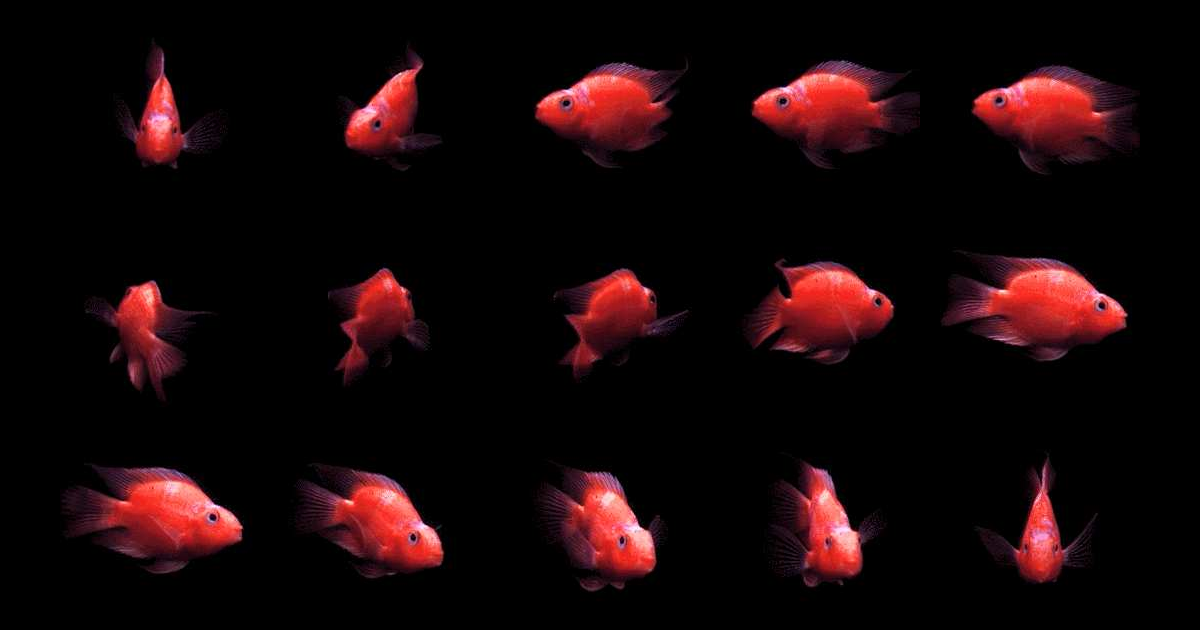
The MOPy Fish screensaver from 1997 featured a surprisingly life-like fish moving around your screen.
As part of my project to bring MOPy back to life, I used AI to reverse engineer the original screensaver and learned what made it move.
Contents
Still images
I had a hunch the screensaver animated the fish from a sprite sheet of bitmaps. I remember Street Fighter did so, and as a kid I had fun changing how the characters looked in good old MS Paint.
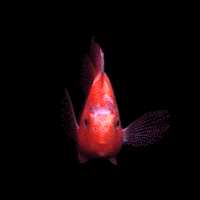
It turned out to be even simpler than that. Inside IMAGES.DLL the RE agent found 662 separate 200×200 JPEG frames. Every pose of the fish is its own image:
Reels, events and swim programs
The screensaver plays these frames in 33 predefined sequences (reels). I always find it fascinating how much creative developers can get out of such limited resources. Many reels play forwards at one time and backwards at another, which makes the movement look far more varied. Some reels also reuse segments of other reels.
Events put the fish into different states: startup, hunger, feeding, or clicks around the tank. When the state ends, the fish swims freely again. Each reel has rules for which reel plays next, and a random number generator (RNG) picks between them to keep things interesting.
A reel only decides how the fish looks. Where it goes on your screen while the reel plays is set separately: either a fixed step, or one of 15 swim programs that use randomly generated numbers when they start. I took those apart in How MOPy Fish Swims.
See the 33 reels
Each animation below is one reel, played in place: its frames in stored order, forwards, at the screensaver's normal speed of 80 ms per frame. The fish stays in one spot, so you see only the poses and the fin motion. The last frame holds for a second before the reel starts again.


Some descriptions in the table below come from the code and describe movement across the screen, such as rising, diving or dashing off. You won't see that here, because a swim program moves the fish while the reel plays. Reels 1 and 29 repeat 10 and 8 times in the screensaver; here each plays once.
Reel descriptions
Here's the full breakdown of the 33 reels:
| # | Frames | Fish behavior | Based on |
|---|---|---|---|
| 1 | 1-7 | Hovering, the default. Repeats 10 times, and most free swimming passes through it | Code + frames |
| 2 | 8-16 | Hovering, slight sway | Frames |
| 3 | 17-55 | Intro drift: down and slightly back | Code |
| 4 | 56-79 | Chasing the mouse up and down | Code |
| 5 | 80-87 | Nose against the glass, fins fluttering | Code + frames |
| 6 | 88-119 | Diving to the bottom (sprint, part A) | Code |
| 7 | 129-163 | Peering down at an angle | Frames |
| 8 | 152-162 | Leaning in toward the viewer | Code + frames |
| 9 | 266-293 | Swimming back in from the left | Code |
| 10 | 168-176 | Small head tilt | Frames |
| 11 | 177-215 | Turning to face the viewer while approaching | Code + frames |
| 12 | 216-293 | Coming toward the viewer | Code |
| 13 | 294-318, 129 | Turning between front view and angled pose | Frames |
| 14 | 336-363 | Startled by a tank click | Code |
| 15 | 364-393 | Eating: turns head-up toward the food | Code + frames |
| 16 | 387-393 | Eating, short loop | Code + frames |
| 17 | 393-405 | Eating, longer loop | Code + frames |
| 18 | 366-393 | Finishing eating: the head-up turn played in reverse | Code + frames |
| 19 | 168, 411-418 | Small head tilt | Frames |
| 20 | 168-171 | Small head tilt, returning | Frames |
| 21 | 8-16, 419-432 | Hovering, sway | Frames |
| 22 | 164-167, 522-524 | Hovering variant | Frames |
| 23 | 129-152 | Peering down at an angle | Frames |
| 24 | 443-521 | Full turn to the right and back | Frames |
| 25 | 164-591 | Rising toward the surface (longest clip, 153 steps) | Code |
| 26 | 592-633 | Turning away and swimming off sideways | Code + frames |
| 27 | 294-318, 129 | Turning between front view and angled pose | Frames |
| 28 | 120-125 | Getting ready to sprint: turns side-on and arches (part B) | Code + frames |
| 29 | 125-128 | Getting ready to sprint: straightens out, repeats 8 times (part C) | Code + frames |
| 30 | 319-335, 406-410, 634-657 | Turning back to face front | Code + frames |
| 31 | 433-442 | Fin flare, likely a left-click reaction | Frames |
| 32 | 294-318, 129 | Turning between front view and angled pose | Frames |
| 33 | 659-662 | Dashing off-screen to the right (end of the sprint) | Code |
There is also a 34th state the fish can be in: frame 658.
That's when you've not fed him for 15 days and he's DEAD.
The behavior descriptions were all generated by an Opus 5.5 agent inside the RE-project, and marked according to confidence:
- Code: The behavior was determined from the program itself: what triggers the sequence (a click, feeding, hunger) and how the code moves the fish while it plays (position, direction, distance from the glass).
- Frames: An educated guess by the RE-informed agent from looking at still images of the sequence. The code gives no clear role for it.
- Code + frames: The images match what the code does, which makes these the most reliable descriptions.
So they could differ from what the developers intended, or from how the typical human viewer experiences and interprets the fish's behavior. But they give you an idea about the types of animation sequences used to create the impression of a living fish.
If you'd like to see for yourself, you can experience MOPy Fish straight in your browser here: https://mopyfish.com
I'm Simon Ahm, and I take on contract work. If this post is close to what you're working on, I can help: consultedo.com.